RA81X-I-013 RA81 FCO
Order Number: 29-11762-00
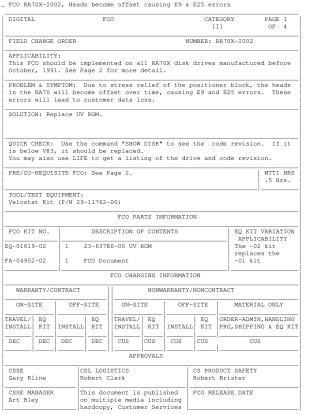
This Field Change Order (FCO RA70X-1002) addresses a critical issue on RA70X disk drives manufactured before October 1991.
Problem: Due to stress relief in the positioner block, the heads of these drives can become offset over time, leading to E9 and E25 errors and potential customer data loss.
Solution: Replace the existing UV ROM (microcode) with an updated version (V83, part number EQ-01619-02). Drives with a microcode revision below V83 (checkable via "SHOW DISK" command) require this replacement.
Procedure Summary:
- Preparation: Refer to technical manuals for accessing the Electronic Control Module (ECM) assembly. Use a Velostat Kit for ESD protection.
- Disassembly: Separate the HDA (Head Disk Assembly) from the ECM. Carefully separate the two interconnected ECM modules (read-write and servo modules) by disengaging connectors J5 and J6, emphasizing ESD precautions.
- ROM Replacement: On the read-write module, locate socket E4 (the only socketed IC). Gently pry out the old UV ROM using a small flat-bladed screwdriver as leverage, being careful not to bend pins or puncture fingers. Straighten pins of the new EQ-01619-02 UV ROM, align it, and gently push it into socket E4 until fully seated.
- Reassembly: Realign and reattach the two ECM modules, then reassemble the drive (ECM to HDA, reinstall in cabinet).
- Post-Installation: Power on the drive and verify it passes power-up and spin-up diagnostics (LEDs off, ready light on). Run HSC/HOST diagnostics for 15 minutes within the drive's diagnostic area.
- Reporting: Update the LARS (service record) system.
Site structure and layout ©2025 Majenko Technologies