VT1200
User Guide
Order Number: EK-V1200-UG
This document is a User's Guide for the Digital Equipment Corporation VT1200 Video Terminal, published in July 1990. It serves as a comprehensive manual for installing, operating, and maintaining the VT1200 terminal.
Key aspects covered include:
- Terminal Overview: Describes the VT1200's components (system box, monitor, keyboard, mouse) and its ability to run both X Window System applications (DECwindows) and Video Terminal Emulation (VTE) windows (compatible with VT series terminals like VT320) simultaneously on VMS, ULTRIX, or UNIX host systems.
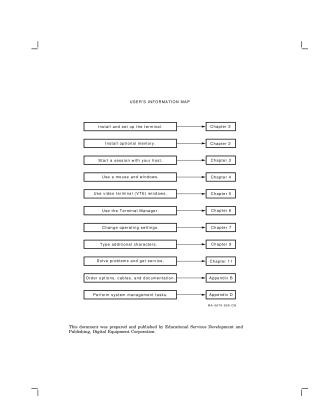
- Installation: Provides step-by-step instructions for site preparation, connecting the terminal's components (monitor, keyboard, mouse, network/serial cables), and installing optional memory (RAM and ROM boards).
Operation & Management:
- Session Management: Guides users on starting and ending sessions with various host systems using the Terminal Manager, supporting both LAT (for VMS) and TCP/IP TELNET (for UNIX/ULTRIX) protocols.
- Window Usage: Details how to use the mouse and interact with X Window and VTE windows, including manipulating, selecting, moving, resizing, and copying/pasting text.
- Customization: Explains how to change operating settings for display, keyboard, mouse, security, host/printer ports, network protocols, and character sets.
Keyboard Use: Provides a detailed description of the LK401 keyboard, its layout, and methods for typing standard and additional characters (e.g., those with diacritical marks).
- Troubleshooting: Offers guidance on solving common operating problems, understanding screen error messages, and obtaining service.
- Technical Appendices: Includes specifications, information on ordering options and related documentation, detailed communication protocols (serial, LAT, TCP/IP), and system management tasks for administrators (e.g., preparing host environments).
The guide is intended for general users, installers, and system managers, and also provides a programming summary for developers working with VTE window applications.
Site structure and layout ©2025 Majenko Technologies