KN31x CPU Installation Card
Order Number: EK-DSCPU-IN
This document is a quick reference guide for installing a KN31x CPU module into AlphaServer DS20E or AlphaStation DS20E systems.
It outlines a four-step installation process:
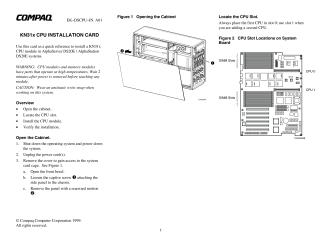
- Opening the Cabinet: Requires shutting down the system, unplugging power, and then removing the cover by opening the front bezel, loosening a captive screw, and sliding the side panel off.
- Locating the CPU Slot: Specifies that the first CPU must be placed in slot 0, and a second CPU (if applicable) in slot 1.
- Installing the CPU Module: Involves removing the CPU from its packaging, carefully sliding it into the correct slot, firmly pressing it into the connector, securing it with screws, connecting the DC power harness, and then reassembling the system (replacing cover/bezel and plugging in AC power).
- Verifying the Installation: Users are instructed to issue the
show CPUcommand to confirm the status of the CPU modules.
The guide also includes important safety warnings about handling hot components (wait 2 minutes after power-off) and the necessity of wearing an antistatic wrist strap. A URL is provided for finding supported options and part numbers.
Related Documents
| AlphaServer DS20E AlphaStation DS20E Reference Guide | ER-K8F6W-UA |
Site structure and layout ©2025 Majenko Technologies