Compaq Storageworks Installing an HSG80 Fibre Channel Controller GLM
Order Number: EK-80GLM-IN
This document provides detailed instructions for installing and replacing Gigabit Link Modules (GLMs) in Compaq HSG80 Fibre Channel Array Controllers, covering both single-controller and dual-redundant configurations, with specific procedures for ACS Version 8.x and 8.2.
General Process (Applies to most scenarios):
- Preparation & Safety: Always use electrostatic discharge (ESD) precautions (e.g., a grounded wrist strap). Dismount logical units from the host console.
- Controller Shutdown: Depending on the configuration, shut down the relevant controller(s) using
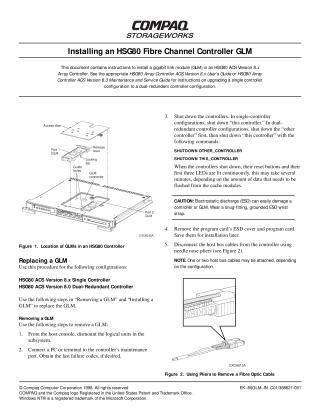
SHUTDOWN THIS_CONTROLLERorSHUTDOWN OTHER_CONTROLLER. - Physical Removal: Disconnect host bus cables, remove the program card, unsecure the access door, disengage the GLM's locking tabs and release levers, then carefully pull out the GLM.
- Physical Installation: Carefully insert the new GLM, ensuring proper alignment with guide pins, and firmly pressing it into place to secure it.
- Post-Installation: Reconnect host bus cables, reinstall the program card, and restart/verify the controller(s).
Key Differences by Configuration:
HSG80 ACS Version 8.x Single Controller & 8.0 Dual-Redundant Controller:
- The process involves more direct manual steps for shutdown, removal, and installation.
- Verification and time setting are done via commands like
SHOW THIS_CONTROLLER FULLandSET THIS_CONTROLLER TIME.
HSG80 ACS Version 8.2 Dual-Redundant Controller:
- This procedure heavily relies on the
FRUTIL(Field Replacement Utility). - Removal: Requires disabling failover (
SET NOFAILOVER), runningRUN FRUTIL, and following its interactive menu to quiesce device ports and guide the removal of the controller containing the GLM. - Installation: Also uses
RUN FRUTILto manage the process, including guiding the insertion of the new controller, restarting the "other controller" (RESTART OTHER_CONTROLLER), and finally re-enabling failover and copying the subsystem configuration (SET FAILOVER COPY=THIS_CONTROLLER).
- This procedure heavily relies on the
Important Cautions:
- ESD: Crucial to prevent damage to the controller or GLM.
- Alignment: Proper alignment of the controller in its guide rails is vital to avoid damage to the backplane.
- Quiescing: Allowing device ports to fully quiesce (especially when prompted by FRUTIL) is essential to prevent data loss.
Site structure and layout ©2025 Majenko Technologies