Compaq Storageworks Installing an HSG80 or HSZ80 Cache Module
Order Number: EK-80CAH-IN
This document provides instructions for replacing a cache module in Compaq HSG80 and HSZ80 Array Controllers (Versions 8.x). It outlines distinct procedures for single-controller and dual-redundant controller configurations.
General Process:
- Preparation: Dismount logical units/shut down the server and host system. Connect a PC or terminal to the controller's maintenance port.
- Removal:
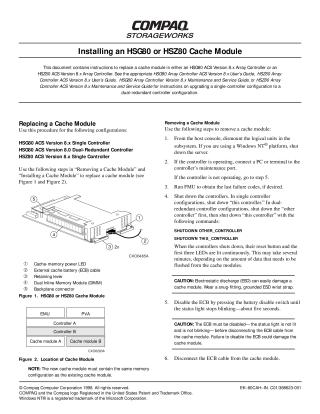
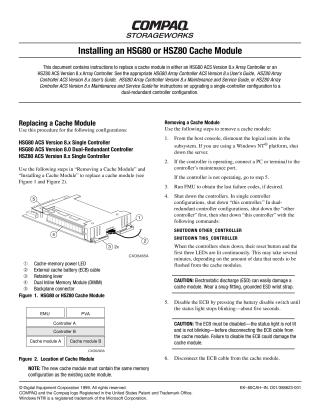
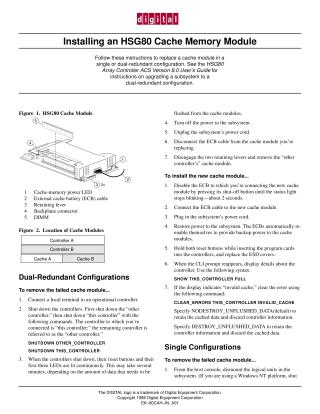
- For Single Controllers: Shut down the controller, disable the External Cache Battery (ECB), disconnect its cable, then physically remove the cache module.
- For Dual-Redundant Controllers (all 8.x versions): Disable failover (
SET NOFAILOVER) and use theRUN FRUTILutility. FRUTIL guides the process, quiesces device ports, and prompts for the removal of the cache module. Disable the ECB and disconnect its cable before physical removal.
- DIMM Transfer: In all cases, remove the Dual Inline Memory Modules (DIMMs) from the old cache module and install them into the new replacement module. The new module must have the same memory configuration.
- Installation:
- For Single Controllers: Ensure the ECB is disabled, connect the ECB cable to the new module, insert the new module, then restart the controller. Set the subsystem date and time.
- For Dual-Redundant Controllers: Use
RUN FRUTILagain. It will guide the installation, manage port restarts, and confirm the cache module and ECB are functioning. Ensure the ECB is disabled before connecting its cable to the new module, then insert the new module. Re-enable failover and copy the subsystem's configuration (SET FAILOVER COPY=THIS_CONTROLLER).
- Post-Installation: Mount logical units on the host and disconnect the PC/terminal.
Key Cautions:
- Electrostatic Discharge (ESD): Always wear a grounded ESD wrist strap. Cache modules and DIMMs are highly sensitive to ESD.
- External Cache Battery (ECB): The ECB must be disabled (status light off/not blinking) before disconnecting or connecting its cable, as failure to do so can damage the module.
- Module Alignment: Ensure the cache module is correctly aligned with guide rails to prevent damage to the backplane.
- Port Quiescing (Dual-Redundant): For dual-redundant configurations, allow FRUTIL to fully quiesce device ports before removal and restart them after installation to prevent data loss. There are strict time limits for these steps.
Site structure and layout ©2025 Majenko Technologies