Installing an HSZ70 Cache Module
Order Number: EK-70CAH-IN
This document provides detailed instructions for replacing an HSZ70 cache module in a Digital HSZ70 Array Controller, covering both dual-redundant and single controller configurations.
Key aspects include:
VHDCI Cable Precautions: Emphasizes careful handling of very-high density cable interconnect (VHDCI) connectors due to their sensitive mating surfaces. Users are advised to clean them, hand-mate them before tightening to 1.5 inch-pounds, and test connections.
Dual-Redundant Configurations:
- Removal: Requires connecting to the operational controller, disabling failover using
SET NOFAILOVER, and utilizing theFRUTIL(Field-Replacement Utility) to guide the safe removal of the "other controller's" cache module, including disconnecting the External Cache Battery (ECB) cable. - Installation: Involves disabling the ECB, connecting its cable, indicating readiness to
FRUTIL, inserting the module, and then using commands likeRESTART OTHER_CONTROLLERandSET FAILOVER COPY=THIS_CONTROLLERto re-establish the dual-redundant configuration and copy system settings.
- Removal: Requires connecting to the operational controller, disabling failover using
Single Configurations:
- Removal: Requires dismounting storage units from the host, optionally connecting a local terminal to obtain failure codes using
FMU(Fault Management Utility), shutting down the controller (SHUTDOWN THIS_CONTROLLER), turning off power, disconnecting/disabling the ECB, and then physically removing the module. - Installation: Involves inserting the new module, connecting the ECB cable, restoring power (which automatically restarts the controller and re-enables the ECB), and finally mounting storage units on the host.
- Removal: Requires dismounting storage units from the host, optionally connecting a local terminal to obtain failure codes using
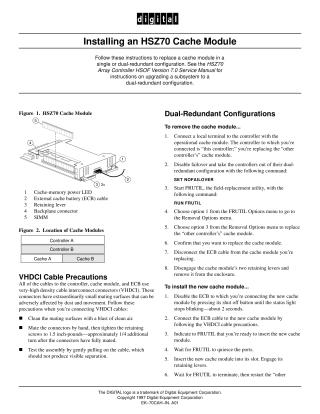
The document also provides a diagram of the HSZ70 Cache Module and its components, and a table showing cache module locations within Controller A and B.
Site structure and layout ©2025 Majenko Technologies