cw smc expired certificate
Order Number: XX-36659-84
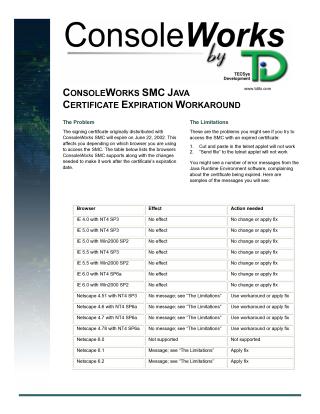
This document addresses the expiration of the ConsoleWorks SMC Java signing certificate on June 22, 2002, which affects access to the SMC depending on the browser used.
Impact: Users attempting to access ConsoleWorks SMC with an expired certificate may experience a loss of cut/paste and "send file" functionality in the telnet Java applet, along with Java Runtime Environment error messages about the certificate being expired.
- Internet Explorer (all tested versions): Generally unaffected by the symptoms, but the fix is still recommended.
- Netscape (versions 4.51-4.78, 6.1, 6.2): Users will encounter the limitations and/or error messages. Netscape 6.0 is not supported.
Solutions:
- The Fix (Preferred): Replace the
TELNET.JARandTELNET.CABfiles in theC:\CWKS\HTMLdirectory on the SMC system with new versions signed to expire in 2010. These files should be obtained with the TechNote or from SMC support. After replacement, all browser instances must be closed and restarted. - The Workaround (For Netscape V4.78 and prior): Load the TDi CA certificate. This involves accessing the SMC via Netscape, navigating to the "Download: Local: TDi Certificate" screen, accepting the certificate by checking all three boxes, and naming it "TECSys Development CA." This workaround allows the telnet Java applet to function until 2010.
Site structure and layout ©2025 Majenko Technologies