EDT Editor Reference Card
Order Number: AV-J756A-TC
This document is an EDT Editor Reference Card, providing a comprehensive guide for keypad and keyboard editing on VT52 and VT100 terminals.
Key aspects covered include:
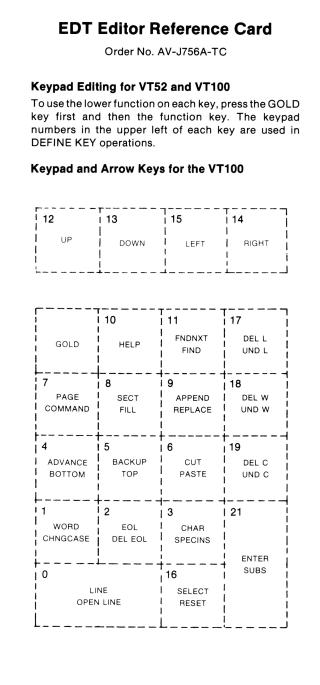
- Keypad Usage: It details how to use the keypad, emphasizing that pressing the GOLD key first accesses the lower (secondary) function of each key, and keypad numbers are used for DEFINE KEY operations. Visual layouts of the VT100 and VT52 keypads with their primary and secondary functions are provided.
Core Editing Functions:
- Navigation: Moving the cursor by characters, words, lines, pages, sections, or to the beginning/end of the buffer. Includes arrow key functions and directional modes (ADVANCE/BACKUP).
- Text Manipulation: Inserting material (SPECINS, OPEN LINE), selecting text ranges, copying (CUT), pasting (PASTE), reformatting (FILL), changing case (CHNGCASE), and replacing text (REPLACE, SUBSTITUTE).
- Deletion and Restoration: Various deletion commands (DEL C/L/W, DEL EOL, DELETE, CTRL/U) and their corresponding "undo" functions (UND C/L/W) for restoring text from character, line, or word buffers.
- Searching: FIND and FNDNXT for locating strings.
Keyboard Functions: A list of standard keyboard operations (BACKSPACE, DELETE, LINE FEED) and CTRL-key commands for tasks like computing/adjusting tab levels, defining keys, ending operations, refreshing the screen, and returning to line editing.
- Session Management: Instructions for starting an EDT editing session (using DCL/PDS or MCR/CCL commands and the CHANGE command) and ending it (EXIT to save, QUIT to discard changes).
- Help and Commands: Explanations for the HELP function, using the COMMAND key to enter commands, and the ENTER key to complete them.
- Repeating Functions: How to repeat keypad functions using the GOLD key or autorepeat features specific to VT100 and VT52.
In essence, it's a quick-reference guide illustrating the layout and function of keys and commands necessary for efficient text editing within the EDT editor environment on these specific terminals.
Site structure and layout ©2025 Majenko Technologies