PDP-11 Keypad Editor Reference Card
Order Number: AV-H854A-TC
This document is a reference card for the PDP-11 Keypad Editor (KED/K52), designed for use with VT100 and VT52 terminals. It outlines various functions and commands for text editing.
Key Features and Functions:
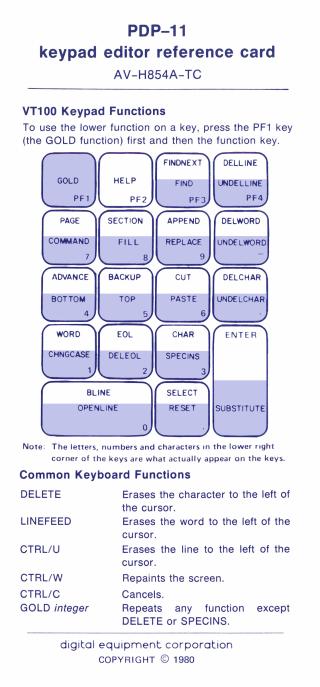
- Keypad Usage (VT100 & VT52): Explains how to use the dedicated keypad. The PF1 (GOLD) key is crucial, acting as a shift key to access the lower/secondary function printed on each keypad key. Specific keypad layouts are provided for both VT100 and VT52.
- Common Keyboard Functions: Lists standard text manipulation shortcuts:
- DELETE: Erases character to the left.
- LINEFEED: Erases word to the left.
- CTRL/U: Erases line to the left and stores it in a buffer.
- CTRL/W: Repaints the screen.
- CTRL/C: Cancels commands/processes.
- GOLD integer: Repeats a function multiple times (except DELETE, SPECINS).
- Editor Operation:
- Starting: Use
RUNcommand or specific file specification formats (filespec/I,filespec/C,filespec=old filespec) depending on RT-11 or RSX-11 systems. - Stopping:
QUIT(discards changes),EXIT(saves changes).CTRL/CorCTRL/Zcan return to the monitor or start a new session.
- Starting: Use
- Cursor Movement: Functions for moving by character, word, line (BLINE, EOL), file (TOP, BOTTOM), page, or section.
ADVANCEandBACKUPcontrol directional mode. - Text Insertion:
- Direct typing for printing characters.
SPECINS: Inserts non-printing characters using their ASCII decimal equivalent with the GOLD key.OPENLINE: Inserts a new line.
- Erasing and Restoring:
- Functions like
DELCHAR,DELEOL,DELETE,DELLINE,DELWORD,LINEFEEDerase text and store it in specific buffers (character, word, line buffer). UNDELCHAR,UNDELLINE,UNDELWORDrestore text from these buffers.
- Functions like
- Searching:
FIND: Initiates a new search.FINDNEXT: Finds the next occurrence.SET SEARCHcommands allow specifying search behavior (case sensitivity:GENERAL/EXACT, cursor placement:BEGIN/END, search limits:BOUNDED/UNBOUNDED).
- Select Ranges:
- SELECT: Marks one end of a text range for operations.
- Functions on Select Range:
APPEND(copies),CUT(moves to paste buffer),FILL(reformats lines),REPLACE(replaces with paste buffer content),CHNGCASE(changes case),WRITE SELECT(writes to auxiliary file).RESETcancels the selection.
- Macros:
LEARN(starts recording commands/functions),GOLD S(stops),GOLD X(executes the current macro). - File Management: Commands to
OPEN INPUT/OUTPUTauxiliary files,CLOSE,PURGE,INCLUDE(copy),SKIP, andWRITE(to auxiliary files). - Configuration Commands:
SET ENTITY PAGE/SECTION: Defines what constitutes a page or section (by string or number of lines).SET TABS: Configures structured tabs (GOLD A/D/Efor adjustment).SET WRAP: Sets word-wrap margin.SET SCREEN: Adjusts VT100 display settings (80/132 columns, light/dark background).
- CTRL Key Functions: Details the behavior of various CTRL key combinations (
CTRL/C,CTRL/O,CTRL/Q,CTRL/S,CTRL/U,CTRL/W,CTRL/Z) for canceling, repainting, interrupting output, and returning to the monitor. - Technical Details: Includes a table of special graphic symbols and details buffer capacities for character (2 bytes), word (80 bytes), line (132 bytes), and paste (minimum 512 bytes).
Site structure and layout ©2025 Majenko Technologies