VAX NOTES Quick Reference Card
Order Number: AV-G101A-TE
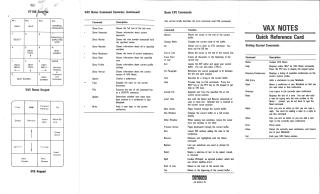
This document serves as a comprehensive quick reference guide for users of VAX Notes and the EVE text editor.
It primarily consists of detailed command summaries and keypad layouts:
Terminal Keypad Diagrams: The document features diagrams of VT100 and VT200 terminal keypads, alongside specific VAX Notes and EVE keypad layouts, illustrating the physical keys and their associated functions for navigation and common tasks (e.g., Gold, Help, Select, Next Topic, Prev Screen).
VAX Notes Command Summary: The core of the document is an extensive list of VAX Notes commands, categorized by function. These commands cover a wide range of operations including:
- Information Display: Showing errors, keywords, members, notes, profiles, and directories.
- Conference and Note Management: Creating, deleting, adding/removing members, updating notes, and attaching files.
- Navigation and Search: Moving through notes, finding specific information, listing directories/conferences.
- System Interaction: Managing buffers, extracting content, and accessing help.
- User Interaction: Answering queries, attaching files.
Basic EVE Commands: A dedicated section outlines basic EVE (Extensible VAX Editor) commands. These include functions for cursor movement (e.g., end of line, top of line), text selection and modification (insert, delete, replace), file operations (save, include file), and spell checking.
Overall, the document provides essential information for efficient interaction with and management of VAX Notes and text editing within the EVE environment, serving as a quick lookup for commands and keypad functions.
Site structure and layout ©2025 Majenko Technologies