DEClaser 5100 Quick Reference Card
Order Number: EK-D5100-RC
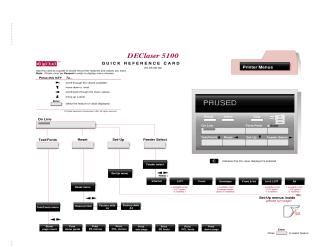
This document is a Quick Reference Card for the DEClaser 5100 printer, serving as a visual guide to its menu structure and settings.
Key features and navigation:
- Accessing Menus: The printer must be in a "PAUSED" state to display menu choices.
- Navigation: Users navigate through menus using arrow keys to scroll values and move between levels, and the "Enter" key to select features or values. A checked box indicates the currently selected value.
- Main Menu Categories: From the "PAUSED" state, the primary menus are:
- Test/Fonts: For printing test pages, font samples, and accessing menu guides.
- Reset: To reset the printer or restore factory default settings.
- Set-Up: The most extensive menu, leading to various configuration options.
- Feeder Select: To choose the paper source (e.g., Internal, LCIT, Front, Envelope).
Detailed Set-Up Menu Categories (organized as flowcharts):
- Feeders: Configure default feeder, manual feed, manual timeout, front tray size, envelope size, and various paper sizes (e.g., A5, Letter, Legal, Executive, custom dimensions).
- PostScript: Adjust resolution (up to 1200x1200), page protection, DECimage settings (enable, adjust brightness, contrast), allow reset, wait timeout, and print error handling.
- PCL (Printer Command Language): Similar to PostScript, it includes resolution, page protection, number of copies, page size, orientation (portrait/landscape), form length, font source (internal, soft font), font number, pitch, point size, and symbol set.
- Communications: Set up Serial, Parallel, LocalTalk, and Network interfaces. This includes I/O timeout, interpreter type (PostScript, PCL, Automatic), mode (e.g., 2-way 1284, Centronics, EIA standards), baud rate, parity, flow control, robust XON, DTR polarity, stop bits, and data bits.
- Miscellaneous: Control general printer functions such as "Do start page," "Do jam recovery," "Print density," "Power saver" mode, "Set-up menu lock," and "Display language" (English, French, German, Italian, Spanish, Dutch).
Many options are noted as "available when [specific option or feeder] is installed," indicating modular functionality.
Site structure and layout ©2025 Majenko Technologies