Enterprise Storage Arrays SBB
User's Guide
Order Number: EK-ESA35-UG
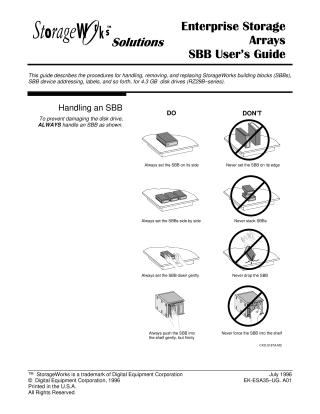
This guide provides procedures for handling, removing, and replacing StorageWorks building blocks (SBBs), specifically for 4.3 GB disk drives (RZ29B-series). It emphasizes proper handling techniques, such as always setting SBBs on their side and gently, never on edge or stacked, and inserting them gently but firmly.
The document details how to identify SBBs using their labels, which provide crucial information like device model, capacity, SCSI logical unit number (LUN), target ID, controller channel, bus width, compatible shelf types, bus speed, and data transfer rate.
For SBB replacement, it outlines two methods: WARM SWAP (for active systems after quiescing the SCSI bus and with no device activity) and COLD SWAP (for initial installation). LED indicators are described to determine the SBB's status (normal, inactive, various fault conditions), with recommended corrective actions typically involving quiescing the bus and replacing the SBB.
Replacement procedures include critical cautions such as ensuring the replacement device is the same model, using both hands to support the SBB, grounding oneself to prevent electrostatic discharge (ESD), and waiting for high-speed drives to "spin-down" before full removal. The guide then lists the steps for removal and insertion, followed by observing status LEDs.
Finally, it explains the SBB connector's design—a 96-pin female DIN connector—which ensures DC power integrity with the SCSI bus. This connector is designed for high reliability, supporting 200 replacement cycles over a 5-year product life, and warns against exceeding this limit to avoid damaging the gold contacts and voiding warranties.
Site structure and layout ©2025 Majenko Technologies