PrintServer 32 Printer Optional Large Capacity Input Tray Installation
Order Number: EK-PRT32-IS
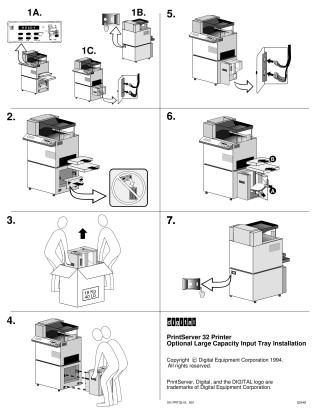
This document provides illustrated steps for installing an optional large capacity input tray for the PrintServer 32 Printer. The process begins by powering off the printer and disconnecting two cables from a side panel. Next, existing trays or modules are removed from the lower front section of the printer. A new 18 Kg (40 Lb) large capacity input tray is then unboxed and carefully inserted into the printer, replacing the removed components. Finally, the cables are reconnected to the printer's side panel, and the printer is powered back on.
Site structure and layout ©2025 Majenko Technologies