PrintServer 32 Printer Optional Large Capacity Output Tray Installation
Order Number: EK-PLCOT-IS
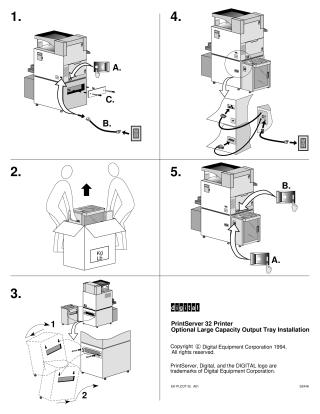
This document provides a step-by-step visual guide for installing an optional large capacity output tray for the PrintServer 32 Printer. The installation process includes:
- Powering off the main printer unit, disconnecting its power cable from the wall outlet, and removing a protective cover from the printer to access an internal connection point.
- Unpacking the new output tray, emphasizing that it requires two people to lift due to its weight.
- Positioning the output tray next to the main printer unit and securing it with screws.
- Connecting the necessary cables: one from the main printer unit to the new output tray, and another from the output tray to a power source.
- Powering on both the main printer unit and the newly installed output tray.
Site structure and layout ©2025 Majenko Technologies