Installing and Cabling the 100BaseTX Mod-MAC (DLXTX)
Order Number: EK-DLXTX-IM
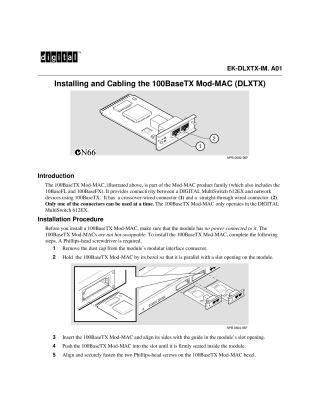
This document provides installation and cabling instructions for the 100BaseTX Mod-MAC (DLXTX), a module designed to connect a DIGITAL MultiSwitch 612EX to network devices using 100BaseTX. The Mod-MAC features both crossover-wired and straight-through wired connectors, but only one can be active at a time, and it operates exclusively with the MultiSwitch 612EX.
The installation procedure outlines steps such as removing the dust cap, inserting the module into a slot, securing it with screws using a Phillips-head screwdriver, and connecting network cables. A key aspect is correctly selecting which port (crossover or straight-through) to use based on the type of cable and the connected network device. The document also details the function of the module's LEDs: an Activity LED that flickers with traffic, and a Port Status LED indicating connection status or if the port is administratively disabled. Critical safety information includes ensuring the module has no power connected before installation, as it is not hot-swappable.
Site structure and layout ©2025 Majenko Technologies