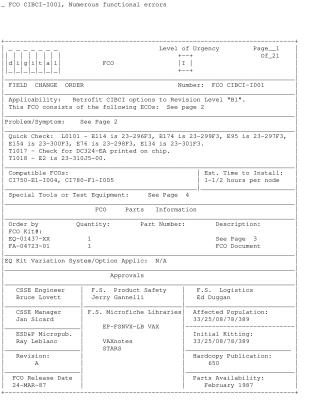
FCO CIBCI-I001, Numerous functional errors
Order Number: 23-310J5-00
This Field Change Order (FCO CIBCI-I001) details the procedure for retrofitting Computer Interconnect Basic Interface (CIBCI) options to Revision Level "B1" to address numerous functional errors. These errors include arbitration timeouts, internal queue retry errors, buffer length violations, cluster hang issues, BI timeout errors from the BIIC, PLA malfunctions, and parity errors on BI data.
The upgrade primarily involves updating the CIBCI microcode to Revision V7.0. This process takes approximately 1-1/2 hours per node and requires:
- Software Update: Copying the CI780.BIN microcode file (V7.0) and associated diagnostics from magtape to the system disk, then to an RX50 floppy, and finally to the VAX 8800 console hard disk. This step must precede hardware changes to ensure compatibility during system reboot.
- Hardware Upgrade (L0101 Module): Replacing six pluggable PROMs on the CIBCI's L0101 module with new V7.0 PROMs, and marking the module "J1". This requires a full system shutdown, power off, and strict electrostatic discharge (ESD) precautions using a VELOSTAT kit.
- Module Replacement (T1017 and T1018): If the T1017 or T1018 modules are below specific revision levels (D1 for T1017, C1 for T1018), they must also be replaced.
- Verification: After installation, the system must be powered on, and specific LEVEL-III diagnostics (EVGAA/B V3.5 for CIBCI, plus others for CPU operation) must be run to verify the upgrade's operational status. The expected microcode and ROM revision levels should display as "0007".
The document also provides detailed part numbers for the new components, compatible FCOs, required special tools, and a directory listing of the diagnostic files included on the upgrade magtape. It emphasizes the importance of checking revisions, proper shutdown procedures, and careful handling of static-sensitive devices.
Site structure and layout ©2025 Majenko Technologies