FCO 9XXX-0016, Problems Related to Memory ECC Error Reporting
Order Number: EQ-01644-01
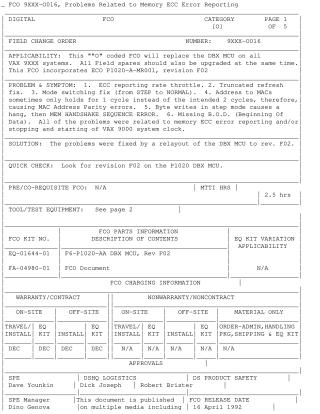
This Field Change Order (FCO 9XXX-0016) details the process for replacing the DBX MCU (Memory Control Unit) on all VAX 9XXX systems with revision F02. The FCO addresses six specific problems, all stemming from issues with memory ECC error reporting and/or the VAX 9000 system clock's stopping and starting. These issues include ECC reporting rate throttle, truncated refresh, mode switching errors, MAC Address Parity errors due to timing, system hangs in step mode, and missing Beginning Of Data (B.O.D.).
The solution involves installing a new DBX MCU with a relayout to revision F02 (part number EQ-01644-01, F6-P1020-AA DBX MCU, Rev F02). Prerequisites include ensuring the system's console software is at BL15.0, with minimum CPU Kernel revision C, SCU revision B3, and SPU revision BL15.0. The installation procedure involves performing diagnostics, updating SITESPECIFIC.CMD on the SPU console to reflect new CDB and revision levels, powering down the system, physically replacing the DBX MCU(s) (DB0 and/or DB1 depending on memory configuration), powering up, and then running verification diagnostics, loading VDS, running MACRO diagnostics, and booting VMS. The document also specifies reporting this activity on a LARS form.
Site structure and layout ©2025 Majenko Technologies