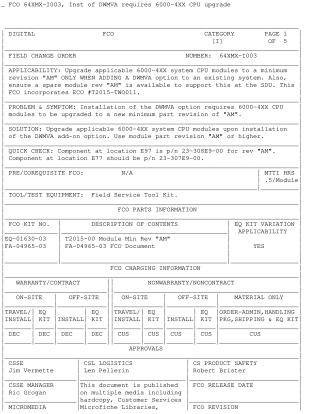
FCO 64XMX-1003, Inst of DWMVA requires 6000-4XX CPU upgrade
Order Number: 23-308E9-00
This Field Change Order (FCO) outlines the mandatory CPU upgrade procedure for 6000-4XX system modules when installing a DWMVA add-on option. The core problem is that the DWMVA option requires 6000-4XX CPU modules to be at a minimum part revision of "AM".
The solution involves upgrading all applicable 6000-4XX system CPU modules to revision "AM" or higher. A crucial prerequisite is that the VAX/VMS operating system must be at Version 5.4-3 or later before the DWMVA option is installed.
The installation procedure involves:
- System Shutdown: Shutting down the VAX/VMS operating system and halting the primary processor.
- Initial Configuration: Using console commands (INITIALIZE, SHOW BOOT, SHOW SYSTEM SERIAL) to record system information and setting terminal baud rate to 1200.
- Power Down: Fully powering off the system and taking ESD precautions.
- Hardware Upgrade: Removing the XMI cardcage cover, replacing existing T2015-00 CPU modules (if below revision "AM") with new "AM" revision modules from FCO kit EQ-01630-03.
- DWMVA Installation: Installing the new DWMVA option according to its guide.
- System Power Up: Powering on the system and configuring it via console commands (SET SYSTEM SERIAL to update EEPROM, SET BOOT).
- Diagnostics and Restart: Booting the Diagnostic Supervisor (VDS) and running specified diagnostics to ensure system integrity, then bringing the operating system back online.
- Post-Installation: Updating the Site Management Guide and reporting FCO activity.
Site structure and layout ©2025 Majenko Technologies