DEC 4000 Model 600 Series Quick Installation
Order Number: 17-01364-02
This document provides a quick installation guide for the DEC 4000 Model 600 Series system, covering unpacking, physical setup, initial connections, and power-up procedures.
Key steps and information include:
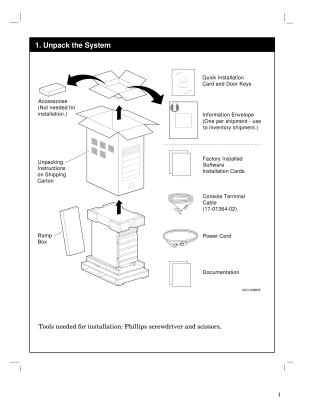
- Unpacking: Identify and unpack essential components such as the Quick Installation Card, Door Keys, Information Envelope, Factory Installed Software Cards, Console Terminal Cable, Power Cord, and Documentation. Tools required are a Phillips screwdriver and scissors.
- Rolling Off Pallet: The system is heavy (at least 118 kg/254 lb) and requires two people to move. Instructions are provided for unlocking wheels and rolling the system off the ramp box.
- Positioning: Details physical specifications (Height: 883mm, Width: 499mm, Depth: 775mm, Weight: 124 kg max) and environmental requirements (Operating temperature: 10-35°C, Relative humidity: 20-80%). It also specifies minimum airflow clearance and power requirements.
- Switch Settings: Ensure the DC On/Off Switch is set to "Off (O)", the Halt Switch is in the "In" position, and the AC Circuit Breaker is set to "Off (O)" before proceeding.
- Console Terminal Connection: Connect the console terminal using the provided cable (17-01364-02) and set the console baud rate to 9600. Instructions for connecting an optional modem are also included.
- Power Cord Connection: Connect the system, modem, and console terminal power cords to an active 20A grounded wall outlet. Warnings about internal components and the need for proper grounding are emphasized.
- System Expansion: Explains how to expand the system using SCSI/DSSI connectors (A-E) by removing terminators and attaching expansion cables.
- Power On Sequence: The system should be turned on in a specific order: UPS (if optional), Console terminal, Peripherals/Expanders/Modems, AC circuit breaker (rear), and finally the DC on/off switch (front). Expected power-up diagnostic displays are shown.
- Software Installation: For systems with pre-loaded software, refer to specific user information or guides (e.g., OpenVMS Factory Installed Software User Information). For detailed installation or hardware/diagnostics information, consult the DEC 4000 Owner's Guide.
- Network Connections: Provides instructions for connecting the system to various network types: ThinWire, Standard Ethernet (Thickwire), and 10BASE-T (Twisted Pair), including details on Ethernet select switch settings and cable connections for each option.
For more detailed information on specific topics like diagnostics, system repair, or CPU/memory operation, the document refers users to the DEC 4000 Owner's Guide, Service Guide, Options Guide, and Technical Manual.
Site structure and layout ©2025 Majenko Technologies