System Installation and Startup Guide
Order Number: XX-68A5A-90
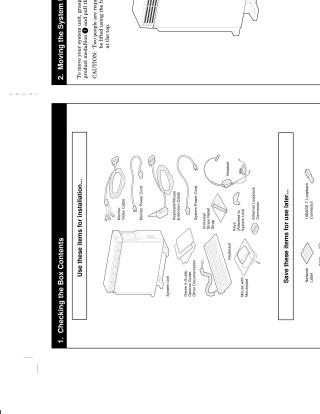
This document provides a step-by-step guide for setting up and starting a computer system. It begins by outlining the items included in the box for installation and those to save for later use. It then covers how to safely move the system unit, recommending two people and specific lifting points, and how to select an appropriate location considering ventilation, power outlet proximity, and space for cables.
The guide provides detailed instructions for connecting various components: the universal strain relief strap, different types of monitor cables (color, monochrome/greyscale), and all rear cables including Ethernet, keyboard/mouse, monitor video, and system power. It also explains how to set specific system switches (like S3) and connect the keyboard and mouse to their extension cable.
Finally, the document instructs users to check all connections and ensure power switches are off before plugging into a wall outlet. It then provides the correct sequence for powering on the system: monitor, any expansion box, and then the system unit. It concludes by directing users to specific operating system documentation (OpenVMS Alpha AXP, DEC OSF/1 AXP) for further installation or startup details if the system came preloaded.
Site structure and layout ©2025 Majenko Technologies